


Preface
Migrating files from Google Drive to OneDrive is common in users’ daily life due to various reasons. Specifically, when users want to integrate with Office services such as OneNote, OneDrive, PowerPoint, Outlook, etc., they would like to move files from Google Drive to OneDrive. However, the question is how to accomplish this task efficiently, especially when users have a great many files to migrate.
In this article, you will learn the best 2 third-party services that aim to help you to migrate various files from Google Drive to OneDrive seamlessly and effortlessly. Both of them are useful and reliable. After reading the comparisons between them, you can choose the best service for yourself.
How to Transfer Files from Google Drive to OneDrive
It is time-consuming and troublesome to migrate files between cloud drives via downloading and uploading since it is definitely manual work. With the advancement of cloud transfer tools, you now are able to simply utilize those excellent third-party services to deliver the goal. Here, we will introduce 2 main cloud transfer tools in the market, namely MultCloud and Wondershare Inclowdz.
Cloud Transfer Service 1: MultCloud
MultCloud is an intelligent and user-friendly cloud sync and transfer service that offers you a convenient platform to manage multiple cloud drives and accounts. You can add many personal and business cloud drives to it, such as Google Drive, OneDrive, OneDrive for Business, Google Workspace, Dropbox, Dropbox Business, Flickr, MEGA, Amazon S3, SharePoint Online, FTP, NAS, and so on. So, you can add these clouds you use to MultCloud and manage them all together.
The way to transfer data between Google Drive and OneDrive via MultCloud is easy and simple because it provides you with an industry-leading migration speed. That’s to say, you don’t need to worry if you have a large number of files. Meanwhile, customized and scheduled transfer tasks are allowed to be set up. So, you can also make entire, partial, and automatic transfers based on your requirements.
Here’s how to transfer files from Google Drive to OneDrive with MutlCloud:
Step 1: Create a MultCloud account for free. Or, you can sign in with your Google or Facebook account.
Step 2: Sign in with your account, then head to Add Cloud on the left-hand sidebar to add Google Drive and OneDrive, respectively.
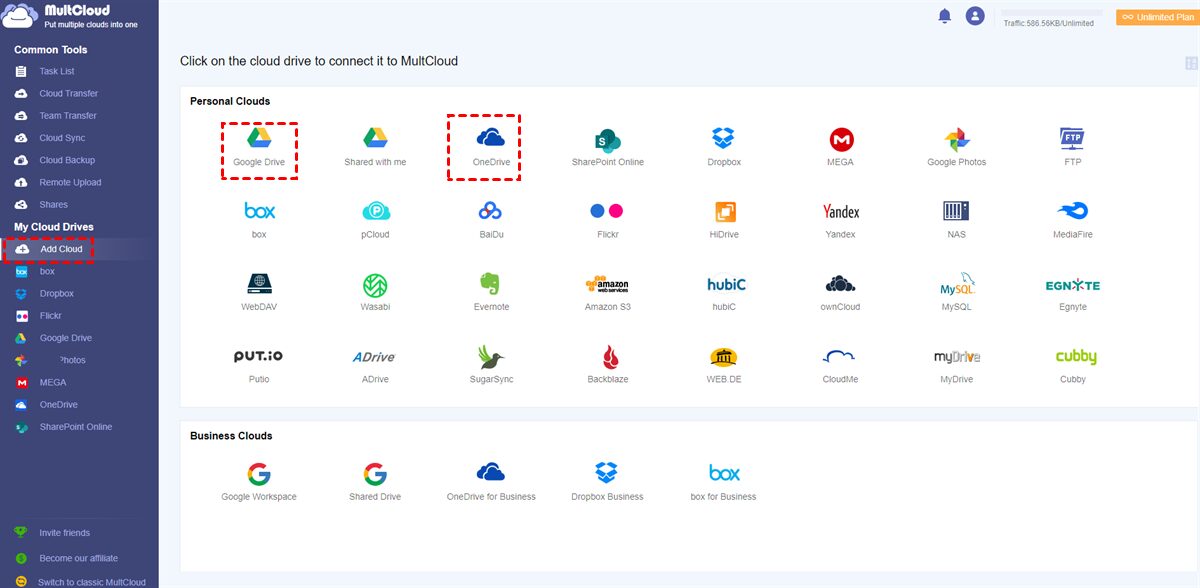
Step 3: Then hit the Cloud Transfer tab on the left taskbar. Press the first box to select Google Drive and the second box to choose OneDrive. After that, Transfer Now.

When transferring files from Google Drive to OneDrive, you will only need to perform the 3 steps above. Likewise, when you intend to move Google Photos to OneDrive, you can also follow the same steps above. And the only difference is the source and target cloud drives.
Cloud Transfer Service 2: Wondershare Inclowdz

Wondershare Inclowdz is another famous cloud transfer tool for cloud users to move data across different cloud services. Similar to MultCloud, it supports many cloud drives in the market, including Google Drive, Google Photos, Dropbox, OneDrive, and so on. This tool allows users to manage multiple clouds in one platform and move data between cloud drives directly.
Although Wondershare Inclowdz offers similar features, it is different from MultCloud. For instance, one of the first virtues of Wondershare Inclowdz is that it offers an app for users to download and install. Whereas MultCloud is a web-based cloud file manager and doesn’t have a mobile/desktop app (but it will have one sooner).
However, Wondershare Inclowdz is more expensive than MultCloud since it limits how many cloud drives/accounts users can add. If you want to add more than 5 clouds, you have to upgrade your account. Contrastingly, MultCloud has no limitation on how many clouds you can add. Meanwhile, MultCloud offers users free 5GB of data traffic to migrate data between clouds every month. So, MultCloud is more cost-effective.
In the End
Anyway, both services are useful and smart. They can make it easier to transfer all Google Drive files from one account to another. If you have a limited budget and want to enjoy more features, then MultCloud is your best choice. However, if you think you need an app, then Wondershare Inclowdz should be your priority.






Mult cloud is amazing I am using this since last two months and it quite impressive.