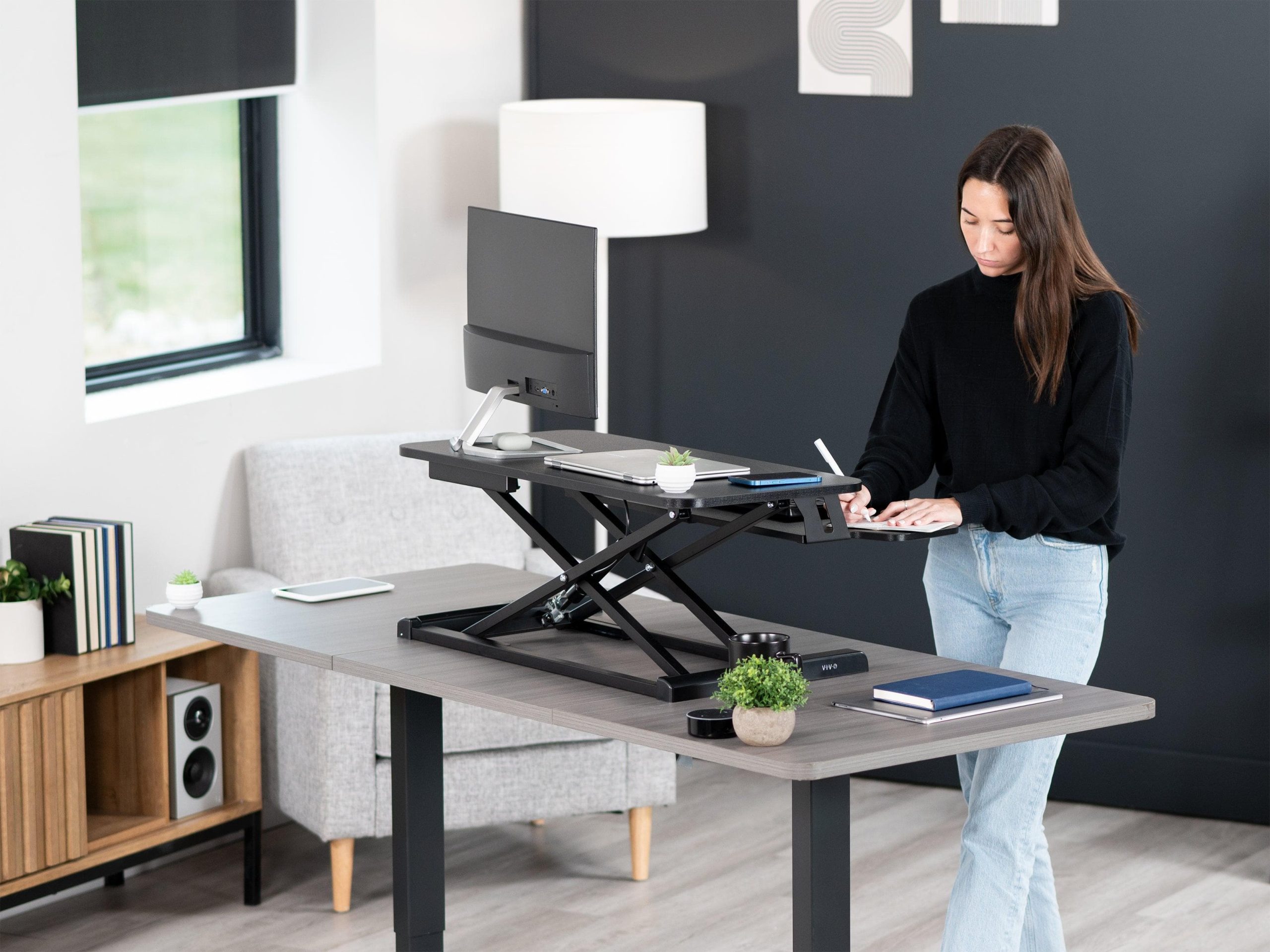
Most people don’t want to replace their desk. They want to stop feeling stiff by 4 PM. That gap is exactly where a riser desk fits: a platform that sits on the desk you already own and lifts your screen and keyboard to standing height in a few seconds.
If you’ve been Googling what a riser desk is and getting answers that read like product brochures, this guide is the plain version: how the mechanism actually works, how it differs from a full standing desk, what height to set it to, and when it’s genuinely the wrong buy.


What is a riser desk?
A riser desk is an adjustable platform that sits on top of a standard desk and raises your monitor, laptop, and keyboard from seated height to standing height. It’s also sold as a desk riser, sit-stand desk riser, or standing desk converter. You keep your existing desk; only the work surface moves.
Example: You have a 29-inch (74 cm) fixed desk. You place a riser on top, lift it to about 44 inches (112 cm), and now you’re typing while standing. Push it back down, and you’re seated again, same desk, same room, same cables.
In short: A riser desk is a retrofit. A standing desk is a replacement.
How does a riser desk work?
A riser desk works through a lift mechanism hidden under the top surface. You release a lever, handle, or button; the platform travels vertically (or in an arc), and it locks at your chosen height while carrying the weight of your equipment.
There are four mechanisms on the market, and the one you pick decides how the desk feels every single day:
| Mechanism | How it moves | Effort to adjust | Best for |
| Gas spring (pneumatic) | Squeeze handle, lifts in an arc | Very low 2–3 seconds, one hand | Frequent switching, laptop + single monitor |
| X-lift / scissor (manual) | Squeeze levers on both sides, straight up | Low, but needs two hands | Budget setups, light loads |
| Z-lift (manual crank/lever) | Straight vertical travel, stays over the desk edge | Medium | Shallow desks, dual monitors |
| Electric | Motorised, button or memory preset | Almost none | Heavy loads, mobility limitations, shared desks |
Two details matter more than the marketing does. Gas spring risers are load-calibrated gear; much lighter than the rated range springs up too fast; heavier gear won’t hold. And arc-lift models drift toward you as they rise, so on a shallow desk the keyboard can overhang the edge.
In short: The mechanism isn’t a spec; it’s the difference between switching posture eight times a day and switching twice.
Riser desk vs standing desk: what’s the real difference?
A riser desk sits on your existing desk and raises only your equipment. A standing desk replaces the whole desk and raises the entire surface, including anything else on it. The riser is cheaper and reversible; the standing desk gives a cleaner, more stable workstation.
| Factor | Riser desk (converter) | Full standing desk |
| Installation | Unbox, place, done (5–10 min) | Assembly required (45–90 min) |
| Cost | Entry-level to mid | Mid to premium |
| Existing desk | Kept and reused | Replaced |
| Stability when standing | Good to fair depends on the desk below | Excellent |
| Usable desk space | Reduced (the riser occupies footprint) | Unchanged |
| Portability | Moves between desks and rooms | Effectively fixed |
| Load capacity | Typically 15–35 kg / 33–75 lb | Often 70–125 kg / 150–275 lb |
| Rented / shared space | Ideal no modification | Difficult |
| Best for | Testing sit-stand, laptop or single-monitor setups | Heavy multi-monitor, all-day standing |
Here’s the honest trade-off nobody puts on the product page: a riser desk inherits the weaknesses of the desk underneath it. A wobbly IKEA-era desk with a riser on top at full height wobbles more, not less. Check the desk you already have before you check the riser.
In short: Choose a riser desk to change your posture. Choose a standing desk to change your workstation.
Riser desk benefits
The benefit isn’t standing. It alternates, giving your spine, hips, and shoulders a different load every 30–45 minutes instead of one fixed load for eight hours.
- Less neck and upper-back discomfort. In the CDC-published Take-a-Stand workplace study, participants using sit-stand devices reported a 54% reduction in upper back and neck pain, with symptoms returning after the devices were removed.
- Reduced sedentary time. The WHO physical activity guidelines recommend limiting sedentary behaviour and replacing it with movement of any intensity a riser makes that switch frictionless.
- Better screen ergonomics. Laptop users look down all day. Raising the screen toward eye level corrects forward head posture, often the real source of the ache.
- Zero-commitment trial. You learn whether you actually like standing before paying for a motorised desk.
- Renter- and office-friendly. No drilling, no furniture disposal, no facilities request.
One caveat worth stating plainly: a riser desk is not a treatment. If you have existing back, hip, or knee pain, standing more can aggravate it. Talk to a physiotherapist about how to phase it in.
Are riser desks worth it?
Yes, for the specific case where you like your desk, work mostly on a laptop or single monitor, and want to try standing without replacing furniture. No, if you run three heavy monitors, need a rock-solid surface, or already know you’ll stand for hours.
Let’s take the three objections we hear most:
“Won’t it just wobble?” Wobble at standing height usually comes from the desk below, not the riser. Test yours: raise it, type hard, shake the monitor. If the desk frame flexes, add a cross-brace or move the riser nearer a leg before blaming the converter.
“I’ll stop using it after two weeks.” That’s the real risk, and it’s caused by friction. If adjusting takes two hands, ten seconds, and a cable reshuffle, you’ll stop. One-handed lift plus routed cables is what makes the habit stick.
“Can I just stack books?” For the monitor, as a test, yes. But books don’t give you a keyboard tray at elbow height, and that’s the half of the setup that protects your wrists and shoulders.
When a riser desk is the wrong buy: shallow desks under 60 cm (24 in) deep, glass or unbraced desks, setups over ~30 kg of equipment, or standing sessions longer than 2–3 hours at a stretch. In those cases, a full standing desk is the better spend.
Riser desk height: getting the setup right
Set your riser desk height so your elbows sit at roughly 90–110° with shoulders relaxed, and the top of your screen sits at or just below eye level. Your body height decides the number, not the product manual.
Quick reference for standing keyboard height, measured from the floor:
| Your height | Standing keyboard height | Riser lift needed on a 74 cm / 29″ desk |
| 5’2″ (157 cm) | ~38 in / 96 cm | ~9 in / 22 cm |
| 5’6″ (168 cm) | ~40.5 in / 103 cm | ~11.5 in / 29 cm |
| 5’10” (178 cm) | ~43.5 in / 110 cm | ~14.5 in / 37 cm |
| 6’2″ (188 cm) | ~46 in / 117 cm | ~17 in / 43 cm |
Desk riser setup checklist:
- Set the keyboard first, screen second. Elbows decide platform height; the monitor arm then brings the screen to eye level.
- Screen distance: roughly an arm’s length, 50–75 cm (20–30 in).
- Wrists flat and floating, not pressed on a hard edge while typing.
- Add an anti-fatigue mat. Hard tile or laminate is the most common reason people quit standing.
- Set a rhythm. Cornell’s ergonomics guidance suggests roughly sit 20 minutes, stand 8, move 2; start looser (45/15) and build up.
Common mistake: raising the screen to a perfect height while leaving the keyboard on the desk below. That forces shrugged shoulders and is worse than not standing at all.
How to choose a riser desk
Work through these seven checks in the order they’re ranked by how often they cause returns:
- Height range vs your body. Match the maximum lift to the table above, adding your desk’s existing height. Too short is the #1 complaint.
- Weight capacity with 30% headroom. Weigh your monitor, laptop, dock, and speakers; then buy above that.
- Separate keyboard tray. Non-negotiable if you type for a living.
- Desk depth compatibility. Arc-lift risers need front clearance; Z-lift models suit shallow desks.
- Monitor count and mount type. Two 27-inch screens usually need a wide platform plus a VESA-compatible monitor arm, not just a shelf.
- One-handed adjustment. If it needs two hands, usage drops off fast.
- Build quality signals. Steel frame over plastic, BIFMA-tested load ratings, and a warranty of 3+ years on the lift mechanism.
In short: Height range and keyboard tray decide whether it works. Adjustment effort decides whether you keep using it.
Best riser desk for your home office setup
There’s no single best riser desk for home office use. There’s a best match for your gear. Find your row:
| Your setup | What to look for | What to skip |
| Laptop only | Compact gas-spring riser, single tier | Wide dual-monitor platforms |
| Laptop + one monitor | Gas spring, keyboard tray, 15+ kg capacity | Manual X-lift (too fiddly daily) |
| Dual monitors | Wide Z-lift or electric, 25+ kg, monitor arm ready | Arc-lift on a shallow desk |
| Small or shallow desk | Z-lift, straight vertical travel, narrow footprint | Anything that drifts forward |
| Creative / drawing work | Large flat platform, tilt-capable tray | Fixed-tier designs |
| Shared desk (two users) | Electric with memory presets | Manual anything |
5 mistakes people make in their first week
- Standing too long, too soon. Four hours on day one means sore feet and an abandoned riser by day four.
- Ignoring footwear and flooring. Hard floors plus flat shoes cancel most of the comfort benefits.
- Leaving cables un-routed. Every lift tugs the HDMI cable, and that friction kills the habit.
- Placing the riser at the desk’s weakest point. Position it near a leg, not mid-span.
- Treating it as posture insurance. It reduces static load; it doesn’t replace walking or stretching.
FAQs About What Is a Riser Desk
What is a desk riser?
A desk riser is in the same product category as a desk riser, an adjustable platform placed on an existing desk to raise your screen and keyboard to standing height. Some brands use “desk riser” for simple monitor-only stands and “riser desk” for full sit-stand converters with a keyboard tray, so check for the tray before buying.
Is a riser desk the same as a standing desk converter?
Yes. “Riser desk,” “desk riser,” “sit-stand desk riser,” and “standing desk converter” all describe a platform that sits on a normal desk. A standing desk, by contrast, is a complete desk with a height-adjustable frame that replaces your current one.
How high should a riser desk go?
High enough that your elbows reach 90–110° while standing. For most adults between 5’2″ and 6’2″, that means 9–17 inches (22–43 cm) of lift above a standard 29-inch desk. Taller users should verify maximum lift before ordering.
Can a riser desk hold two monitors?
Many can, but capacity varies widely. Two 27-inch monitors weigh roughly 10–14 kg with stands, so look for a platform rated 25 kg or more, a wide surface, and ideally VESA mounting so the weight sits on an arm rather than the shelf.
Do riser desks wobble?
A well-built riser is stable at full height. Wobble usually originates in the desk underneath long unbraced spans, glass tops, or four-leg desks without a cross-brace. Test your desk before adding a riser, and place the riser near a leg.
How long should I stand at a riser desk each day?
Start with 15 minutes per hour and build gradually. Alternating every 30–45 minutes suits most people. The goal is a variety of postures, not a daily standing target. Sitting is not the enemy; staying frozen in one position is.
Are riser desks worth the money for a home office?
They’re worth it if you want sit-stand benefits without replacing a desk you like, and if your setup is under roughly 30 kg. If you need maximum stability, run heavy multi-monitor rigs, or plan to stand for hours, put the money toward a full standing desk instead.
Will a riser desk fix my back pain?
It can reduce the static load that contributes to discomfort, and research links sit-stand use to less neck and upper-back pain. But it isn’t a medical device. If you have persistent or worsening pain, see a physiotherapist or doctor before changing your setup.
Conclusion
So, what is a riser desk? It’s the low-risk, low-cost way into sit-stand working: a platform on the desk you already own, lifted with a lever or a button, that lets you change posture in seconds instead of sitting still for eight hours.
Get three things right, and it’ll last years: enough height range for your body, a proper keyboard tray, and an adjustment action light enough that you’ll actually use it. Get them wrong, and it becomes an expensive monitor stand.
Next step: measure your desk height, weigh your equipment, and match both to the tables above before you shop.