Exporting iPhone contacts to a CSV or Excel files can be a useful and convenient way to manage and backup your contacts. However, the process of exporting contacts directly from your iPhone can be challenging without the right tools.
In this article, we will explore the best method for exporting iPhone contacts to Excel or CSV files. We will introduce FoneTool, a powerful tool that simplifies the process and offers a range of features to enhance your contact management experience. By following the step-by-step instructions provided, you can easily export your iPhone contacts to Excel or CSV files and have them organized and accessible on your computer.


Can you export iPhone contacts to excel/CSV files?
Yes, you can export your iPhone contacts to Excel or CSV files. However, the built-in Contacts app on the iPhone does not provide a direct export option. To accomplish this task, you will need a reliable third-party tool like FoneTool, which offers a user-friendly interface and advanced features specifically designed for contact management.
The best way to export iPhone contacts to excel/CSV files
Choosing a good tool to export iPhone contact can be half the battle. Luckily, there are a large number of software for iPhone that can enable you to export iPhone contacts, and FoneTool must be the one you need to have a try.
About the company – AOMEI
FoneTool is produced by AOMEI, a reputable software development business renowned for its cutting-edge approaches to disk management, data backup, and recovery. With an emphasis on intuitive user interfaces and cutting-edge technologies, AOMEI has become known for its dependable solutions that meet needs for both personal and professional use.
Features and advantages of FoneTool
With powerful FoneTool, you can easily export contacts from iPhone to Excel or CSV files on your computer. It has got a lot of benefits and features, making it one of the finest options for transferring iPhone contacts.
- Easy-to-use Interface: FoneTool provides a user-friendly interface that makes exporting iPhone contacts a straightforward process, even for non-technical users.
- Multiple Export Formats: With FoneTool, you can export your iPhone contacts to various formats, including Excel (XLSX) and CSV. This flexibility allows you to choose the format that suits your needs best.
- Selective Export: FoneTool enables you to selectively export specific contacts or groups of contacts to Excel or CSV files. This feature is particularly useful when you only need to export a subset of your contacts.
- Advanced Contact Management: In addition to exporting contacts, FoneTool offers a range of contact management features. You can edit, add, delete, merge, and organize your contacts effortlessly within the software. It can also help you to know how to print contacts from iPhone.
Can’t wait to have a try? Download FoneTool to your computer, and you can export iPhone contacts to Excel or CSV files by following the steps outlined below.
How to export iPhone contacts using FoneTool
Now, we will guide you on how to export iPhone contacts using FoneTool. Firstly, use a compatible USB cable to connect your iPhone to computer.
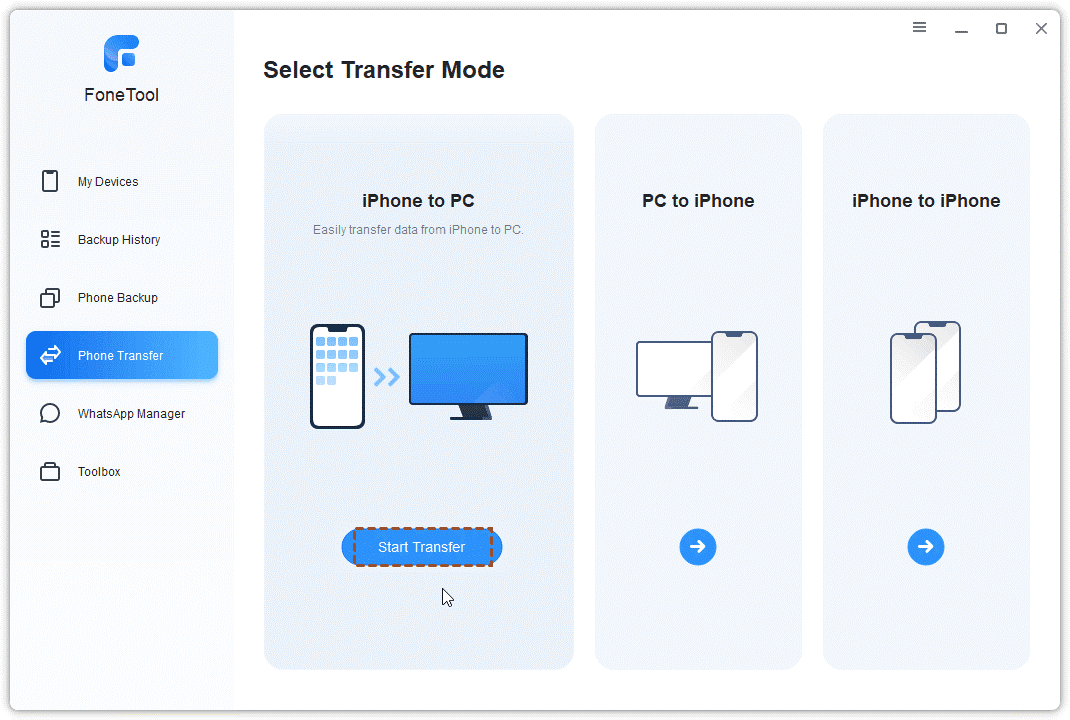
Step 1. Run FoneTool on your computer. From the left pane in FoneTool, choose Phone Transfer. Mouse over to iPhone to PC in the Select Transfer Mode page, and click Get Started.
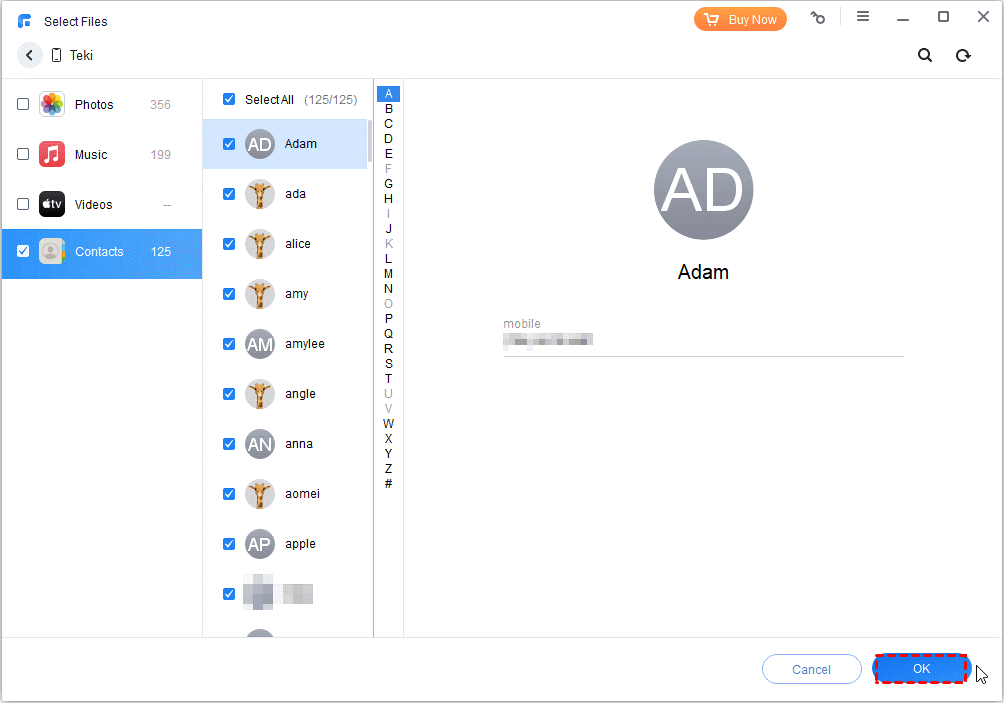
Step 2. In the next page, check Contacts. From here, you can preview all the contacts saved on your iPhone. Select the contacts you’d like to export, and click OK to confirm.
Step 3. Click Transfer Settings from the upper-right corner. Under Contact Settings, choose CSV or vCard as the file type to export.

Finally, click Start Transfer to begin the export task. When it is finished, you can read these iPhone contacts on your PC.
Summary
Exporting iPhone contacts to Excel or CSV files is a valuable process for managing and organizing your contact information. With FoneTool, the task becomes effortless and efficient. The software offers an intuitive interface, multiple export formats, selective export options, and advanced contact management features.
By following the step-by-step instructions provided in this article, you can easily export your iPhone contacts and have them accessible on your computer in Excel or CSV formats. Simplify your contact management and backup process with FoneTool and ensure that your valuable contacts are secure and well-organized.